AI Automation
Table of Contents
- AI Reads Their Data
- AI Makes the Decision
- AI Acts on It
- Humans Handle Exceptions
- Staff Reads Every Email
- Manual Lead Sorting
- Hours on Data Entry
- Decisions Wait on People
The Difference#
Custom Scripting connects your systems. Data moves from A to B based on rules you define. If this, then that. Deterministic. Predictable.
AI Automation adds a brain to the workflow. The AI reads unstructured data, interprets it, makes a judgment call, and routes it accordingly. It does not just move data - it understands it.
The difference is the thinking step. Regular automation moves an email to a folder. AI automation reads the email, determines if the sender is a hot lead or a vendor pitch, extracts the relevant details, and routes it to the right person with a summary. One follows rules. The other makes decisions.
Where AI Belongs in Your Workflow#
AI is not the answer to every automation problem. Moving a row from one spreadsheet to another does not need AI. But these do:
Unstructured Input Processing#
Your business receives data that does not arrive in neat, structured fields. Emails. Voicemails. Chat messages. PDFs. Handwritten forms photographed on a phone. Free-text form fields where customers write whatever they want.
AI reads this input and extracts the structured data your systems need. Customer name, service requested, urgency level, address, budget range - pulled from a rambling email and injected into your CRM as clean, tagged, pipeline-ready data.
Classification and Routing#
Not every lead is the same. Not every support ticket is urgent. Not every email needs the same response. AI classifies incoming data and routes it based on understanding, not keywords.
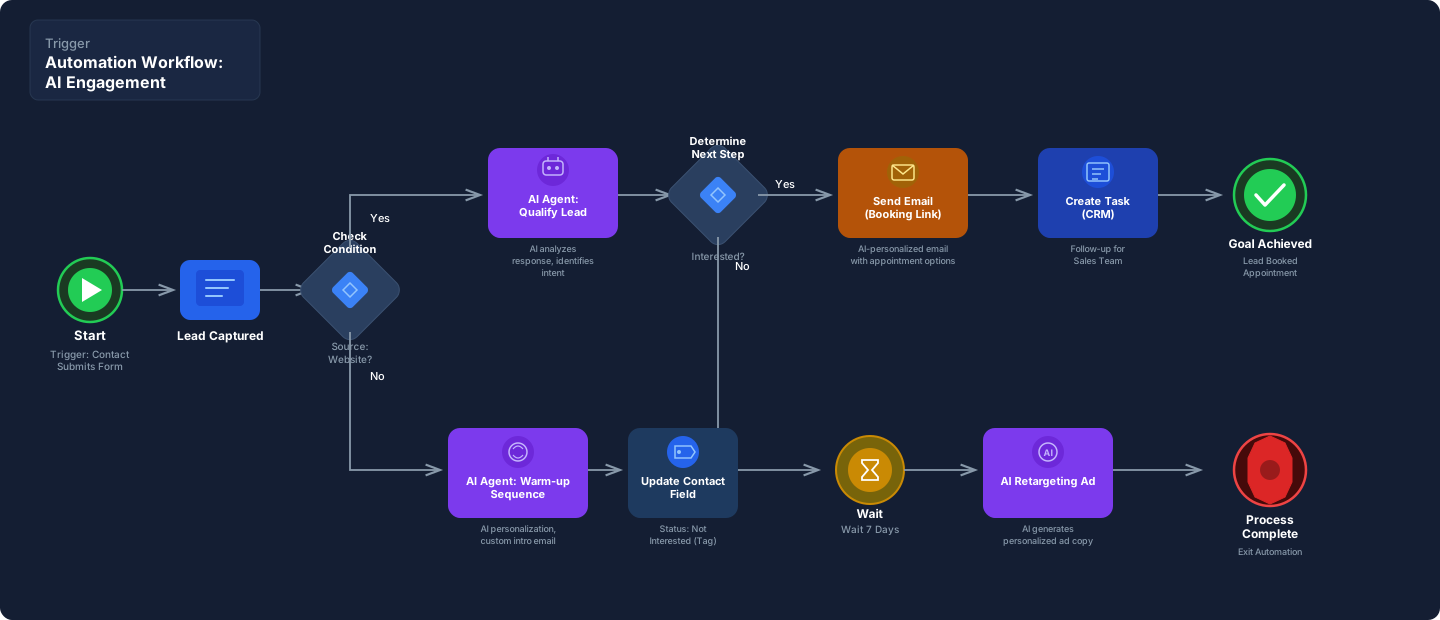
- New lead from a form? AI reads the message, scores the lead (hot, warm, cold), identifies the service they need, and routes to the right pipeline stage.
- Customer email? AI determines if it is a complaint, a question, a referral, or a billing issue. Routes to the right team with context attached.
- Voicemail transcript? AI summarizes the call, tags the intent, and creates a follow-up task with priority level.
Keyword matching breaks when people do not use your keywords. AI handles the infinite ways humans describe the same thing.
Intelligent Review Response#
A new Google review comes in. AI reads the review content, determines sentiment, and generates a response that matches your brand voice.
- Positive review: AI drafts a personalized thank-you that references the specific service mentioned. Auto-posts if confidence is high.
- Negative review: AI drafts a professional response that acknowledges the concern and offers a resolution path. Flags for your approval before posting.
- Suspicious review: AI detects patterns consistent with competitor sabotage or fake reviews. Flags for manual review and potential reporting.
Your reviews get responded to in minutes instead of days. Your brand voice stays consistent. Your team only handles the exceptions.
Lead Enrichment#
A new contact enters your CRM with a name, email, and phone number. That is not enough for your sales team to have an intelligent first conversation.
AI enrichment pulls publicly available data - LinkedIn profile, company size, industry, role, estimated revenue, tech stack - and compiles a briefing. By the time your rep makes the call, they know who they are talking to, what the company does, and what problems they likely have.
Cold calls become warm calls. First conversations sound informed instead of scripted.
Document Processing#
Your business receives documents that a human currently reads, interprets, and enters into a system. Insurance forms. Contracts. Invoices. Permit applications. Inspection reports.
AI reads the document, extracts the relevant fields, validates the data against your business rules, and populates your systems. Exceptions get flagged for human review. Clean documents flow through untouched.
One insurance agent processing 50 applications per day becomes one AI workflow processing 500, with the agent reviewing only the 10% that need human judgment.
Content Generation Pipelines#
AI generates first drafts based on structured inputs. Service descriptions from a feature list. Social posts from a blog article. Email sequences from a campaign brief. Report summaries from raw data.
The AI does not replace your voice. It produces a working draft that your team refines. The hours spent staring at a blank page become minutes spent editing a draft that is 80% there.
The AI Automation Stack#
We build AI workflows on the same platforms we use for custom scripting - n8n, Make, and GHL - but with AI models wired into the decision points.
| Component | What It Does |
|---|---|
| n8n + OpenAI/Anthropic | Complex multi-step workflows with AI classification, summarization, and generation at each decision node |
| Make + AI modules | Visual workflow builder with AI-powered data transformation and routing |
| GHL AI workflows | Native GoHighLevel AI actions for lead response, review management, and conversation handling |
| Custom Python + LLM APIs | Purpose-built scripts for document processing, data enrichment, and batch AI operations |
| Deepgram | Speech-to-text for voicemail transcription, call summarization, and audio data extraction |
| ElevenLabs | Text-to-speech for automated voice content, IVR messages, and audio notifications |
We are model-agnostic. OpenAI, Anthropic, open-source models - we pick based on the task requirements, cost profile, and data sensitivity. Some tasks need GPT-4 class reasoning. Some tasks run fine on smaller, cheaper models. We do not default to the most expensive option.
Common AI Automation Builds#
Inbound Lead Classification Lead submits a form with a free-text description of their needs. AI reads the description, scores urgency (1-5), identifies the service category, and routes to the correct pipeline. Sales team gets the lead pre-qualified with a summary they did not have to write.
Review Response Engine New review detected on Google. AI analyzes sentiment, generates a brand-consistent response, and either auto-posts (positive) or queues for approval (negative/neutral). Response time drops from days to minutes.
Email Triage Shared inbox receives 200 emails per day. AI reads each email, classifies it (lead, support, billing, vendor, spam), extracts key details, and routes to the correct team member with a one-line summary. No one reads the full email unless they need to act on it.
Voicemail Processing Missed call generates a voicemail. Deepgram transcribes it. AI reads the transcript, identifies caller intent, extracts contact details and service request, creates a CRM contact, and assigns a follow-up task with priority. The voicemail that used to sit for 8 hours gets processed in 30 seconds.
Proposal and Quote Assist Sales rep enters deal details into the CRM. AI pulls service descriptions, pricing tiers, and client context, then generates a first-draft proposal. Rep reviews, adjusts, and sends. The 2-hour proposal becomes a 15-minute review.
Data Enrichment Pipeline New contacts enter CRM from multiple sources. AI enriches each record with publicly available company data, role information, and estimated fit score. Deduplicates against existing records. Tags by industry and company size. Sales team opens a pre-researched contact, not a bare name and number.
Guardrails and Accuracy#
AI makes mistakes. We plan for that.
- Confidence scoring. Every AI decision includes a confidence score. High-confidence actions execute automatically. Low-confidence actions get flagged for human review. You define the threshold.
- Human-in-the-loop. For high-stakes decisions (pricing, legal, public-facing content), the AI generates a draft and a human approves. The AI does the work. The human owns the decision.
- Fallback logic. If the AI cannot classify an input or the model returns an error, the workflow defaults to a safe path - usually routing to a human queue. It does not guess and act.
- Output validation. AI-generated content is checked against business rules before it gets posted, sent, or entered into a system. If the output violates a rule (wrong pricing tier, missing required field, inappropriate language), it gets caught before it goes live.
- Audit logging. Every AI decision is logged with the input, the model output, the confidence score, and the action taken. If something goes wrong, we trace the exact decision chain.
This is where cybersecurity engineering meets AI implementation. We do not just ask “does it work?” We ask “what happens when it is wrong?”
AI Automation vs. Custom Scripting#
| Custom Scripting | AI Automation | |
|---|---|---|
| Input | Structured data (fields, triggers, webhooks) | Unstructured data (text, email, voice, documents) |
| Logic | If-then rules you define | AI interprets and decides |
| Output | Deterministic - same input, same output | Probabilistic - AI judgment applies |
| Best for | System wiring, data sync, reporting | Classification, summarization, generation |
| Example | New invoice triggers payment reminder | AI reads invoice, flags discrepancies, routes to AP |
Most businesses need both. Custom scripting handles the plumbing. AI automation handles the thinking. We build them as a unified system.
Why Digital Crunch#
Most agencies bolt an OpenAI API call into a Zapier workflow and call it AI automation. No guardrails. No confidence scoring. No fallback logic. No audit trail. The AI hallucinates a response and it goes straight to your customer.
We are led by a Cybersecurity Engineer with 25 years of experience. We build AI automation the same way we build security systems - assume failure, plan for it, and log everything.
- Model-agnostic. We pick the right model for the task. Not every workflow needs the most expensive API. Some tasks run better on smaller, faster, cheaper models.
- Guardrails engineered. Every AI decision has confidence scoring, fallback logic, and human escalation paths. Your AI does not freelance.
- Security-first. Customer data flowing through AI models gets the same scrutiny as any data exposure surface. Scoped access. Encrypted transit. Minimal retention.
- Integrated with your stack. AI workflows plug into your existing CRM, communication channels, and business systems. Not a separate tool your team has to learn.
Intelligent Automation. Guardrailed AI. Engineered to Decide.