
What is Schema?#
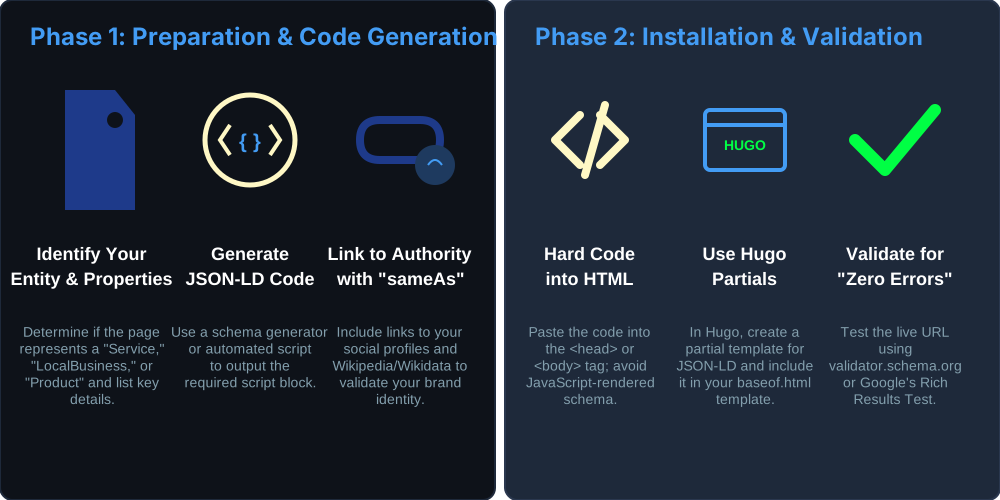
Schema is a type of formatted JSON data that AI and search engines like. It is included in snippets in the header section of a page. There are many types of schema, but we’re going to use one example to explain.
Schema Types#
There are many types of schema. Products, services, people, FAQ, articles, businesses all get different types. Here are the types we use for our site. Yours may be different. Note that each page requires different schema.
Visual Vs Schema#
We have “visual” and “schema”, visual is what your users see. Schema is what AI engines and Google see. They need to match, though they do not have to match letter for letter. They cannot be misleading or disagree. Users do not see schema at all, unless they inspect the source code of your page. Schema is completely for AI and Search Engines to consume.
Schema Importance#
Schema is a trust signal. When you submit your citations (Yelp, Bing, etc.), the search engine and ai search bots will visit your site to verify the data.
If they see “JSON-LD” schema with matching data such as NAP (name, address, phone) your site will receive a higher trust score and thus faster GBP (Google Business Profile) verification.
If they only see “Plain Text” address, you get a medium trust score. Verification may take longer or require a postcard/video.
Schema is also used to provide trust for other types of data. There are multiple schema types and sometimes you use more than one type. For this example, we will only talk about GBP factors such as matching NAP.
We use schema to signal to Google that we are indeed who we say we are. This trust factor helps with search results, and with approval of our GBP. Before we request GBP, we setup schema.
All Pages#
You will likely have at least WebSite and ProfessionalService. These are the predominant schema types on our site.
ProfessionalService: This is your Primary Entity. It defines Digital Crunch as an expert implementation firm in Wylie, TX. It includes your logo, location, and the sameAs links to your LinkedIn and GitHub. Note: ProfessionalService is a specific sub-type of Organization; using it establishes your niche more effectively than the generic Organization tag.
WebSite: Tells Google how your site is structured (includes the Search Box if applicable).
Specific Pages#
If you sell a product, service, or have articles each of those pages ALSO has these types of schema (depending on the page):
Service Schema: Only on your specific service pages (e.g., the AI Voice Receptionist page). This allows you to define the “provider” as your ProfessionalService entity using an @id link.
FAQ Schema: Only on pages where the questions and answers are actually visible to the user.
Article/BlogPosting: Only on your blog pages or articles.
Visual Address Example#
This is “visual”, meaning for humans. It doesn’t carry the same weight as the json schema. It helps, but it’s how you do visuals, not how you rank in search engines. This is the type of visual code used at the bottom of our site. It simply displays the address.
The important parts are itemprop=“xxxx”
<address class="not-italic text-sm text-neutral-500 dark:text-neutral-400" itemscope itemtype="[https://schema.org/ProfessionalService](https://schema.org/ProfessionalService)">
  <span itemprop="name">Digital Crunch</span> ·

  <a href="[https://digitalcrunch.com](https://digitalcrunch.com)" itemprop="url" class="hidden">Digital Crunch</a>

  <a href="[https://www.google.com/maps/search/?api=1&query=2042+Quail+Run+Rd+Wylie+TX+75098](https://www.google.com/maps/search/?api=1&query=2042+Quail+Run+Rd+Wylie+TX+75098)"
     target="_blank"
     rel="noopener"
     itemprop="address" itemscope itemtype="[https://schema.org/PostalAddress](https://schema.org/PostalAddress)"
     class="hover:text-primary-500 transition-colors">
    <span itemprop="streetAddress">2042 Quail Run Rd</span>,
    <span itemprop="addressLocality">Wylie</span>,
    <span itemprop="addressRegion">TX</span>
    <span itemprop="postalCode">75098</span>
  </a> ·

  <a href="tel:+19452454257"
     itemprop="telephone"
     class="hover:text-primary-500 transition-colors">
    (945) 245-4257
  </a>

  <div class="mt-2 text-xs">
    <time itemprop="openingHours" datetime="Mo-Fr 09:00-17:00">Mon-Fri 9am-5pm</time> ·
    <time itemprop="openingHours" datetime="Sa 08:00-13:00">Sat 8am-1pm</time>
  </div>
</address>
Suggested JSON Schema#
Additionally, in the header should be json for the ProfessionalService, address, and sameAs:
{
  "@context": "[https://schema.org](https://schema.org)",
  "@type": "ProfessionalService",
  "@id": "[https://digitalcrunch.com/#organization](https://digitalcrunch.com/#organization)",
  "name": "Digital Crunch",
  "legalName": "James Fraze LLC",
  "description": "Expert AI implementation and automation services in Wylie, TX. Specializing in AI Voice Receptionists and business process automation.",
  "url": "[https://digitalcrunch.com](https://digitalcrunch.com)",
  "logo": "[https://digitalcrunch.com/img/dc_logo_animated.svg](https://digitalcrunch.com/img/dc_logo_animated.svg)",
  "image": "[https://digitalcrunch.com/img/dc_logo_animated.svg](https://digitalcrunch.com/img/dc_logo_animated.svg)",
  "telephone": "+19452454257",
  "priceRange": "$$",
  "address": {
    "@type": "PostalAddress",
    "streetAddress": "2042 Quail Run Rd",
    "addressLocality": "Wylie",
    "addressRegion": "TX",
    "postalCode": "75098",
    "addressCountry": "US"
  },
  "geo": {
    "@type": "GeoCoordinates",
    "latitude": 33.0125,
    "longitude": -96.5385
  },
  "sameAs": [
    "[https://www.linkedin.com/in/digitalcrunch/](https://www.linkedin.com/in/digitalcrunch/)",
    "[https://github.com/rubysash](https://github.com/rubysash)"
  ],
  "openingHoursSpecification": [
    {
      "@type": "OpeningHoursSpecification",
      "dayOfWeek": ["Monday", "Tuesday", "Wednesday", "Thursday", "Friday"],
      "opens": "09:00",
      "closes": "17:00"
    },
    {
      "@type": "OpeningHoursSpecification",
      "dayOfWeek": "Saturday",
      "opens": "08:00",
      "closes": "13:00"
    }
  ]
}
Other Schema#
It’s beyond the current scope of this article to write the other examples of schema, but note they are different for each type. Refer to https://schema.org for details on your type.
Hugo Implementation#
Wordpress has plugins, hugo uses “partials” which is basically a block of code to include in specific parts of your site. You edit the block once and it updates your entire site. We use hugo, so these are instructions for us only (or anyone that uses Hugo).
- Navigate to layouts/partials/head.html (or your equivalent SEO partial).
- Paste the Global Schema inside a
<script type="application/ld+json">…</script>block. - Use the .Params.schema logic to load page-specific blocks from your front matter.
- Push to production and test it at https://validator.schema.org.
Notes#
Schema vs Visual#
- Whatever is in the schema must also be on the page in visible text.
- If you say open saturday 8-1pm in schema, the page must also say that visually.
Add SameAs#
- Once you launch the GBP, add the link to your sameAs array in the schema. This creates the final link in the trust loop.
- Add any other new social feeds you make too, but only if they reinforce your expert implementation brand.
Testing Schema#
https://search.google.com/test/rich-results
Schema Logic#
Remember, this is for hugo only, and for the theme we are using only. Each theme is different.
In the head.html, program logic per type of page to keep your code DRY and avoid bloat:
<script type="application/ld+json">
{
  "@context": "https://schema.org",
  "@type": "ProfessionalService",
  "@id": "https://digitalcrunch.com/#organization",
  "name": "Digital Crunch",
  "address": { ... },
  "telephone": "+19452454257"
  // ... rest of your sitewide info
}
</script>

{{ if .Params.schema }}
<script type="application/ld+json"
  {{ .Params.schema | safeJS }}
</script>
{{ end }}
Weird Situations#
This is more backstory to explain exactly how our schema is set up, and why. I only want to advertise “Digital Crunch” and do not want to advertise “Fraze Marketing”, at least on the digitalcrunch.com domain it should be all about Digital Crunch.
We are keeping linkedIn and github because they are “me” (James Fraze) and displays engineering ability, which is what Digital Crunch is about. Google and AI engines can see my portfolio and work history essentially by linking like this.
Schema “also” links#
I’ve done tech for a long time (21+ years) and my social accounts have not been as a business. Here is what I have:
- James Fraze Github: https://github.com/rubysash
- Logo for DC: https://digitalcrunch.com/img/dc_logo_animated.svg
- Linked In: https://www.linkedin.com/in/digitalcrunch/ (This is a primary authority asset).
Fraze Marketing “also” Links#
I tried to start a marketing agency but nobody wants to hire a “marketer”. Hiring a marketer is a bet and it’s unknown. I have to constantly prove myself to my customers that the bets I suggest are good ones. Installing something they already want though, is easier and doesn’t require near the proof. They already want it so I just install it. The “definition of done” is very clear.
I rebranded and used an old domain that is 21 years old “digitalcrunch.com” in order to sell technology solutions. It is my belief that these are all very good marketing bets, but I’ve found that customers are happier because they have a tangible result (even though it’s a marketing tool).
Both “fraze marketing” and “digital crunch” are still names for “James Fraze” as I am the company principal engineer. We debated on how should I utilize these assets:
There is very little activity on them but about 2 years of account age as I spun up the marketing company:
- Frazemarketing Specific Twitter: https://twitter.com/frazemarketing
- Frazemarketing Specific Instagram: https://instagram.com/frazemarketing
I say this because digitalcrunch and frazemarketing are different niches. Digital Crunch is the “expert” at the tech. We are NOT linking these marketing-branded socials to Digital Crunch in the schema. Linking a marketing niche to an engineering niche confuses Google’s Topical Authority signals.
The lesson in this - if you have multiple things you do/have done, AI search wants to see what you have truly mastered only. Everything else is a watered down signal. Focus on your core offers only, and keep them in a tight niche.
Next Steps#
Very few people in the world are actually certified as Answer Engine Optimization specialists. We are! If you’d like to book a consultation to update your site with valid schema, including llms.txt files, please book directly on my calendar at https://link.frazemarketing.com/widget/bookings/digitalcrunch or call us and book through our AI receptionist:
+1-945-245-4257Schema FAQ#
Q: What exactly is Schema?#
A: Schema (Schema.org) is a standardized vocabulary of tags you add to your HTML to help search engines understand what your content means, not just what it says.
Q: Where does the Schema code go?#
A: The “Gold Standard” is to place JSON-LD Schema inside the
section. In Hugo, place this in layouts/partials/head.html.Q: What is the difference between JSON-LD and Microdata?#
A: JSON-LD (Recommended): A block of JavaScript for bots. Microdata: Attributes (itemprop) inside your HTML for human-readable content. Using both for NAP is a great way to double-verify your local data.
Q: Do I need Schema on every page?#
A: Yes. Your ProfessionalService (identity) should be sitewide. Specific schemas like Service or FAQPage should only be on their respective pages.
Q: Will Schema improve my rankings?#
A: It improves Rich Results (stars, maps, FAQ snippets), which increases Click-Through Rate (CTR). Higher CTR leads to better rankings over time.
Q: How do I know if my Schema is “broken”?#
A: Use the Google Rich Results Test or the Schema Markup Validator.
Q: What is the sameAs property?#
A: It tells Google your website is the same entity as your LinkedIn and GitHub. It builds E-E-A-T (Experience, Expertise, Authoritativeness, Trustworthiness) by connecting your site to your 21-year history.
Q: “Isn’t this just more code that will slow down my site’s load time?”#
A: The technical reality: JSON-LD is a lightweight script block. When placed in the <head> or before the closing </body> tag, it is parsed asynchronously by bots. For a site like Digital Crunch, the entire schema block is likely under 2KB—equivalent to a single tiny thumbnail icon. The SEO and trust gains far outweigh the negligible millisecond of execution time.
Q: “Google is smart enough to read my page. Why do I need to ‘hand-feed’ it JSON?”#
A: While Google can scrape your page, schema removes the “guesswork.” Scraping is probabilistic; Schema is deterministic. By using Schema, you aren’t hoping Google understands your address is a business location; you are explicitly declaring it in their preferred database format. This is the difference between a “Medium” and “High” trust score.
Q: “Does Schema make my site vulnerable to scrapers or AI ‘stealing’ my data?”#
A: If the information is visible on your page, it is already public. Schema doesn’t “leak” new data; it simply organizes your existing public data (NAP, services, prices) so that AI agents (like Perplexity or ChatGPT) can cite you accurately as a source. If you want to be the “Answer” in an AI search result, you must provide the structured data they use to build those answers.
Q: “What happens if my Schema doesn’t match my ‘Visual’ text exactly?”#
A: This is a “Trust Mismatch.” If your Schema says you are open 24/7 but your footer says Mon-Fri, Google may flag the data as unreliable and strip your Rich Results (stars, FAQ snippets). Gold Standard: Use Hugo variables to pull from a single data file (data/business_info.toml) to populate both the Visual and the Schema simultaneously.
Q: “Is Schema a ‘Set it and Forget it’ task?”#
A: Mostly, but not entirely. You should audit your schema whenever you:
- Change your physical location or phone number.
- Add a new core service.
- Gain a major new authority link (e.g., a Forbes mention or a new industry certification).
- Launch a Google Business Profile (you must add the GBP URL to your
sameAsarray).
Q: “I don’t have a physical storefront. Do I still need ‘ProfessionalService’ schema?”#
A: Yes. You can use the areaServed property to define your service radius (e.g., “Texas” or “Wylie + 50 miles”) while hiding your specific street address if necessary (though for Digital Crunch, the physical address in Wylie acts as a strong local trust signal for GBP).
Q: “Is FAQ Schema still worth it now that Google reduced FAQ snippets in SERPs?”#
A: While Google shows fewer FAQ “accordions” in standard search results, LLMs and AI Search (SGE) use FAQ schema heavily to generate direct answers. If you want to be the source for “How does an AI voice bot work?”, FAQ schema is your direct line to the LLM’s training/retrieval context.
Q: “Can I just use one ‘Organization’ tag and be done with it?”#
A: You can, but it’s the “Bronze Standard.” Organization is generic. ProfessionalService or LocalBusiness provides specific attributes like priceRange, openingHours, and geo coordinates. The more specific the “Type,” the higher the trust score for local search rankings. If you use a generic tag, you’re competing with global corporations; if you use a specific tag, you’re dominating your local niche in Wylie, TX.
Q: “Does Schema help with AI Voice Search (Siri, Alexa, Gemini Live)?”#
A: Absolutely. Voice assistants don’t “browse” your site; they query structured data. When someone asks, “Who is the best AI automation engineer in Wylie?”, the assistant looks for a ProfessionalService with a matching addressLocality and knowsAbout (or description) field. Without Schema, you are invisible to voice-activated leads.
Q: “I have multiple businesses/niches. Should I put them all in one Schema block?”#
A: Hard No. This is a “Signal Dilution” error. If you link your “Real Estate Investing” schema to your “Cybersecurity Engineering” site, you confuse the AI’s understanding of your Topical Authority.
- The Rule: One domain, one primary entity. If you have different businesses, they need different domains or very distinct sub-directories with isolated schema. Keep your
sameAslinks relevant only to the current brand’s expertise.
Q: “Is there a risk of ‘Schema Spam’ or getting penalized?”#
A: You only get penalized if you use “Deceptive Schema”—listing reviews you don’t have, services you don’t provide, or FAQ questions that aren’t actually visible on the page. As long as your Visual and Schema match (the “Sameses” rule), there is zero risk of penalty. Google rewards transparency.
Q: “Can I use Schema to hide my home address if I’m a service-area business?”#
A: Yes. In the ProfessionalService block, you can define a ServiceArea (e.g., a 50-mile radius around Wylie) instead of a streetAddress. This tells Google you serve the area without inviting strangers to your front door. However, for maximum trust and GBP verification speed, a verified physical address is always the “Gold Standard.”
Q: “Is it true that AI bots can’t read my Schema if it’s in Google Tag Manager?”#
A: Yes. This is a critical pitfall. Many AI crawlers (like GPTBot or PerplexityBot) often do not execute JavaScript.
- The Gold Standard: Deliver Schema server-side or as static HTML so it is visible in the initial page load.
- The Risk: If you inject schema via GTM (client-side), you are effectively invisible to the very engines you are trying to influence.
Q: “What is the @id property and why is it called an ‘Entity Serial Number’?”#
A: The @id property provides a unique, consistent URI for every entity (Organization, Person, Product) across your entire digital ecosystem. It functions as a digital serial number, allowing AI to connect your website content to your mentions on LinkedIn, GitHub, or Wikidata without ambiguity.
Q: “Can Schema help me build ‘Topical Authority’ (the ACE model)?”#
A: Absolutely. To be an ACE (Authority, Confidence, Entity), you must build a “Content Knowledge Graph”. Using sameAs schema to link your brand to trusted external entities (like Wikidata) and using nested Service schema signals to AI that you are the definitive source in your specific niche.
Q: “Why should I bother with FAQ Schema if Google shows fewer snippets?”#
A: While visual “accordions” in search results may have decreased, FAQPage Schema is a high-priority type for AI visibility. It provides LLMs with “Quotable Assertions”—standalone, declarative data points they can easily extract and cite in AI-generated overviews.
Q: “What is Schema Drift?”#
A: Schema Drift occurs when your structured data does not explicitly match the visible content on your page. AI considers this a data quality issue. If your JSON-LD claims a price or service that isn’t on the page, the AI’s “Confidence Score” in your brand drops, leading to lost visibility and citations.
Checklist#
- JSON-LD Format: Ensure you are using the AI-preferred JSON-LD format rather than Microdata.
- Server-Side Delivery: Verify schema is in the raw source code, not injected via JavaScript.
- Monosemanticity: Ensure each page has a singular, clear schema type (e.g., one primary
Serviceper page) to maximize semantic relevance. - Entity Linking: Use
sameAsto connect Digital Crunch to authoritative third-party profiles to reinforce E-E-A-T. - llms.txt: Consider adding an
llms.txtfile in your root directory to act as a roadmap for AI crawlers.
Troubleshooting#
Common Syntax Gotchas:#
- Trailing Commas: The last item in a list must not have a comma.
- Quotes: All keys and string values must be in double quotes.
- Escaping: If your name has a quote, escape it: "The Tech".
Schema Hierarchy for Digital Crunch:#
- Level 1 (Top): ProfessionalService (Defines the business brand)
- Level 2: PostalAddress & GeoCoordinates (Defines the Wylie, TX location)
- Level 3: Service (Nests under the business via @id to define what you do)